📐 시작하기전에
- 간단한 사전 학습
- 10분안에 배우는 머신러닝 GAN 알고리즘 원리와 응용분야(Generative Adversarial Network 강의,GAN 설명)
- 딥러닝 GAN 튜토리얼 - 시작부터 최신 트렌드까지 GAN 논문 순서
- 알아두면 이해하기 편한 GAN 종류
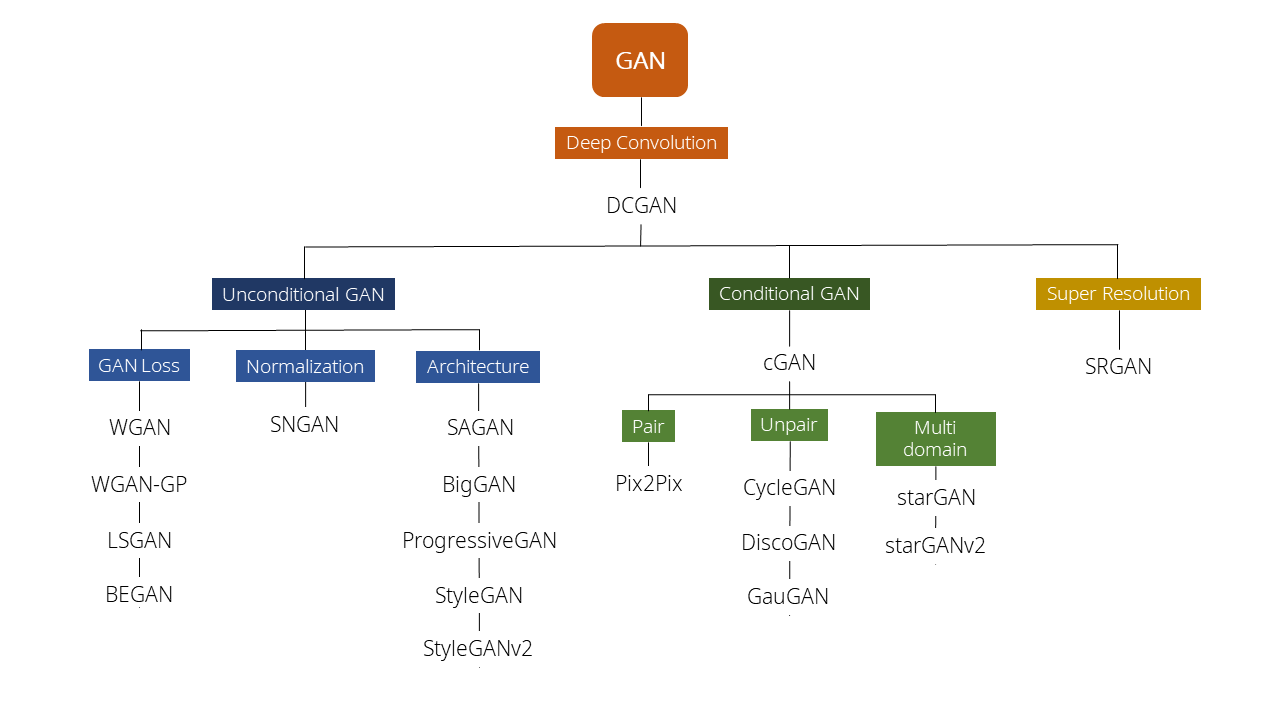
Least Squares GAN : LSGAN
Semi-Supervised GAN : SSGAN, Class 분류와 동시에 진위여부를 확인하는 GAN
Auxiliary Classifier GAN : Class, noise를 이용하여 만들어내는 GAN
Stack GAN : Text를 이용해서 이미지를 생성하는 GAN
Cycle GAN : 그림을 사진으로, 사진을 그림으로, 말을 얼룩말로 얼룩말을 말로!!
Disco GAN : Cycle GAN과 유사, 가방에 신발 디자인을 반영하는 Cross Modality GAN
Design GAN : 새로운 디자인 티셔츠를 만들기
Style GAN : 1024x1024 고화질의 이미지를 만들어내는 GAN ✓(지금 진행)
Adapitve instance normalizaton : AdaIN - Style transfer
🏆 프로젝트 목표
- StyleGAN 이전에 존재했던 이미지 생성 모델(PGGAN)과 StyleGAN의 동작 방식 이해
- 딥러닝 논문에 대한 이해 및 코딩
- 논문 모음
Interpreting the Latent Space of GANs for Semantic Face Editing
Image2StyleGAN++: How to Edit the Embedded Images?
Image2StyleGAN: How to Embed Images Into the StyleGAN Latent Space?
A Style-Based Generator Architecture for Generative Adversarial Networks (CVPR 2019) 논문 ✓(중심 논문)
Analyzing and Improving the Image Quality of StyleGAN
- 실습 코딩 참고자료 모음
https://colab.research.google.com/drive/1s2XPNMwf6HDhrJ1FMwlW1jl-eQ2-_tlk?usp=sharing
https://github.com/NVlabs/stylegan
https://github.com/NVlabs/stylegan2
GitHub - NVlabs/stylegan2: StyleGAN2 - Official TensorFlow Implementation
StyleGAN2 - Official TensorFlow Implementation. Contribute to NVlabs/stylegan2 development by creating an account on GitHub.
github.com
🖥 프로젝트 언어 및 환경
Python, Anaconda(가상 환경),Pytorch, Google Colab,
📎 프로젝트에서 사용한 데이터
- A Style-Based Generator Architecture for Generative Adversarial Networks (CVPR 2019) 논문 에서 사용된 데이터를 최대한 활용하고자 하였습니다.
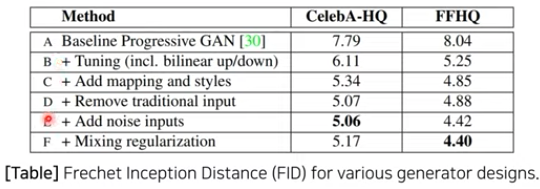
- FFHQ 데이터셋: 고해상도 얼굴 이미지 데이터셋
- CelebA 데이터셋: 유명인 얼굴 데이터셋
- 추가적으로 구글에서 크롤링한 유명인 데이터셋
📎 프로젝트에서 사용한 성능측정 지표
- Disentanglement 관련 두가지 성능측정 지표(CVPR 2019 논문에서 제안)

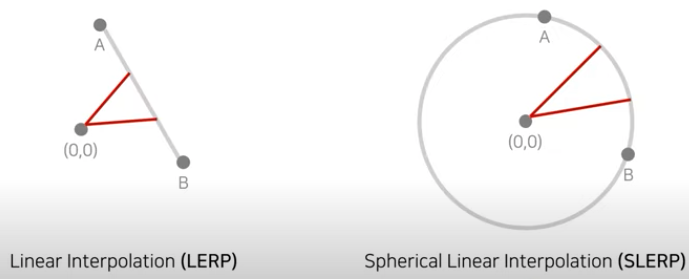
- Path Length : 두 벡터를 보간(interpolation)할 때 얼마나 급격하게 이미지 특징이 바뀌는지 (해당값이 낮을수록 이상적)
(논문에서는 Linear Interpolation(LERP)와 Spherical Linearpolation(SLERP)를 통해 보간함)
- Separability : latent space에서 attributes가 얼마나 선형적으로 분류 될 수 있는지 (해당값이 낮을수록 이상적)
진행한 전처리 과정
- 논문에서 사용된 CelebA-HQ 데이터는 얼굴마다 표정, 안경유무, 성별(gender)등의 40개의 binary attributes가 명시되어 있는 데이터셋이다.
ㄴ 이를 통해 40개의 분류(classification)모델을 학습
- 하나의 속성(attributes)마다 200,000개의 이미지를 생성하여 분류 모델에 입력
ㄴ 이후 Confidence가 낮은 절반을 제거하여 100,000개의 레이블이 명시된 latent vector 준비
ㄴ 이렇게 준비된 100,000개의 데이터를 학습 데이터로 사용
- 하나의 속성(attributes)마다 linear SVM모델 학습
ㄴ 이때 전통적인(Tradirional)GAN에서는 z, Style GAN에서는 w를 이용
📣 프로젝트 발표 시작

❓StyleGAN이란?- 고화질 이미지 생성에 적합한 아키텍처를 제안
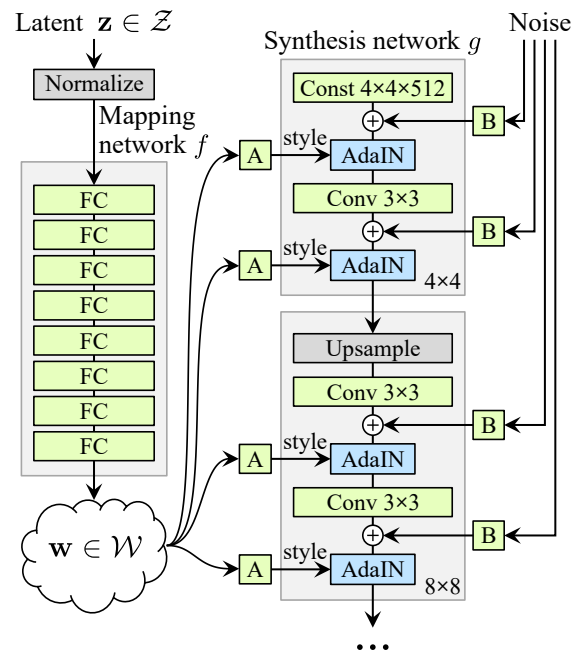
- StyleGAN의 생성자(Generator)는 두 종류의 벡터를 입력받아 최종적인 이미지를 생성
Latent vector(z 혹은 w): 인물의 스타일(style)을 담당
Noise Vector: 인물의 통계적인 자잘한 특성(stochastic variation)을 담당
- 세밀한 스타일 컨트롤을 위해 w를 사용
- 기존에 있던 PGGAN 베이스라인 아키텍처의 성능을 향상
(PGGAN 구조에서 Style transfer 개념을 적용하여 generator architetcture를 재구성 한 논문이다.
그로 인하여 PGGAN에서 불가능 했던 style을 scale-specific control이 가능하게 하였다.)
- Disentanglement 특성을 향상
(Disentanglement는 사진의 선이 어떻게 되어있는지를 의미하며,
예를 들어 일반 사진에 화장, 안경, 문신 등의 변화만을 하려고 했을 때
의도하지 않게 성별이 바뀐다든지 하는 부분을 얼마나 의도적으로 할 수 있게 바꿨는지에 대한 내용이다.)
Entangle : 서로 얽혀 있는 상태여서 특징 구분이 어려운 상태. 각 특징들이 서로 얽혀있어서 구분이 안됨
Disentangle : 각 style들이 잘 구분 되어있는 상태. 선형적으로 변수를 변경했을 때 어떤 결과물의 feature인지 예측할 수 있음
- 사용된 고해상도 얼굴 데이터셋(FFHQ)를 오픈
❓기본이 되는 GAN(Generative Adversarial Network)이란?
GAN은 딥러닝 모델 중 이미지 생성에 널리 쓰이는 모델 (Generative Adversarial Networks, NIPS 2014)
- 기존 딥러닝에서 진행한 '이미지에서 개인지 고양이인지 구분하는 이미지 분류(image classification) 문제'와 달리 데이터셋과 유사한 이미지를 만들도록 하는 것
- 생성자(Generator)와 판별자(Discriminator) 두개의 네트워크를 활용한 생성 모델
- 특정 목적함수(objective function)을 통해 생성자는 이미지 분포를 학습


+) 초창기 버전이다보니 불안정하고 정확도가 부족해서 보완하여 Unsupervised Representation Learning with Deep Convolutional Generative Adversrial Networks(ICLR 2016) 발표 → DCGAN
ㄴ Deep Convolutional Layers를 이용하여 이미지 도메인에서의 높은 성능을 제안

+) GAN의 안정적인 학습유도를 위한 Improved Training of Wasserstein GANs,NIPS 2017 논문 발표 → WGAN-GP

❓StyleGAN의 연구 배경이된 PGGAN이란?
- Progressive Growing of GANs for Improved Quality, Stability, and Variation 논문 발표 → PGGAN=ProGAN
- 학습과정에서 레이어를 점진적으로(progressively)추가하여 고해상도 이미지 학습을 성공
- 다만 이미지의 특징 제어가 어려웠음


[PGGAN] Progressive Growing of GANs for Improved Quality, Stability, and Varation
1. Abstract 1-1. Problem PGGAN(Progressive Growing of GANs)은 2017년도에 나온 Nvidia에서 나온 논문이고 발표 당시 큰 이슈를 받았다고 한다. 그 이유는 그 전까지 GAN들은 고해상도(High resolution) 이미지..
sensibilityit.tistory.com
❗️StyleGAN의 핵심 아이디어 : 매핑 네트워크(Mapping Network)
[논문 내용]
- 512차원의 z 도메인에서 w 도메인으로 매핑을 수행
- 가우시안 분포에서 샘플링한 z 벡터를 직접 사용하진 않음
ㄴ 계산된 w 벡터를 사용 할 때가 효과 좋음을 강조
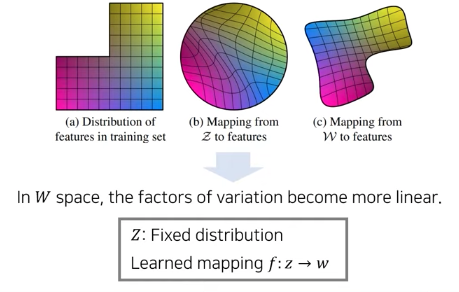
예를 들어,
학습데이터셋(a 그림) - 검정머리, 안경을 착용한 동양인으로 구성
가로 - 안경을 담당하는 차원
세로 - 머리카락색을 담당하는 차원

PGGAN처럼 잠재 변수(Latent variable)을 기반으로 학습하는 생성 모델(StyleGAN은 아님)은 noise 상태에 있는 latent space Z(b 그림)을 학습 데이터 분포와 비슷하게 변화시키는 mapping을 학습하는 것을 목표다 보니 안경을 미착용한 데이터를 생산하고싶어도 학습데이터의 고정된 분포가 non-linear(차원의 기준이되는 선이 손상됨)하게 되어있어 다른 데이터를 생산하기 힘듬.
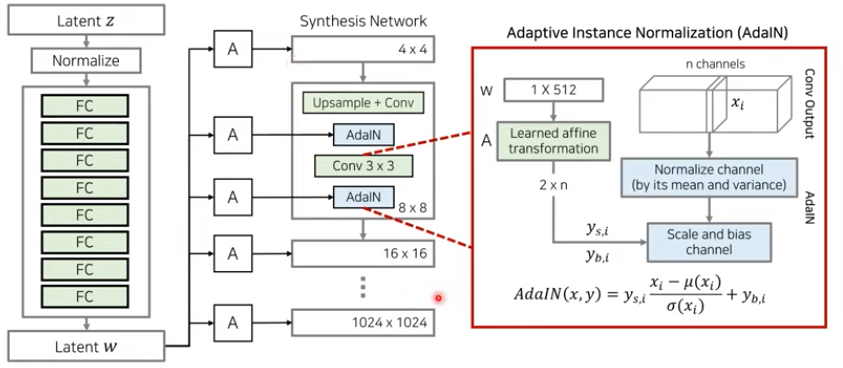
또한 StyleGAN은 다른 원하는 데이터로부터 스타일(style)정보를 가져와 적용 할 수 있도록 AdaIN을 이용했습니다.
관련 연구 : Adaptive Instance Normalization(ADaIN) [논문 설명 자세히 보기]



❗️StyleGAN을 활용하여 시도한 순서
- StyleGAN을 활용한 얼굴 생성 및 모핑
- 얼굴 임베딩(Face Embedding)
- 얼굴 교차(Crossover)
- 임베딩 벡터 연산(Latent Vector Arithmetic)
- 시맨틱 정보 변경(Semantic Editing)
- 스타일 전송(Style Transfer)
- 얼굴 복구(Face Reconstruction)
🖥 실습 진행
# 필요한 라이브러리 호출
import torch
import torch.nn as nn
import torch.optim as optim

import torchvision
from torchvision import models
from torchvision import transforms
from torchvision.utils import save_image

from collections import OrderedDict
from PIL import Image
import matplotlib.pyplot as plt
import numpy as np
import cv2
from stylegan_model import G_mapping
from stylegan_model import G_synthesis
# StyleGAN을 구성하는 두 개의 네트워크 불러오기
g_all = nn.Sequential(OrderedDict([
('g_mapping', G_mapping()),
('g_synthesis', G_synthesis(resolution=resolution))
]))
g_all.load_state_dict(torch.load(weight_file, map_location=device))
g_all.eval()
g_all.to(device)
g_mapping, g_synthesis = g_all[0], g_all[1]
mapping network code
출처: https://github.com/NVlabs/stylegan/blob/master/training/networks_stylegan.py#L300
def G_mapping(
    latents_in,                             # First input: Latent vectors (Z) [minibatch, latent_size].
    labels_in,                              # Second input: Conditioning labels [minibatch, label_size].
    latent_size             = 512,          # Latent vector (Z) dimensionality.
    label_size              = 0,            # Label dimensionality, 0 if no labels.
    dlatent_size            = 512,          # Disentangled latent (W) dimensionality.
    dlatent_broadcast       = None,         # Output disentangled latent (W) as [minibatch, dlatent_size] or [minibatch, dlatent_broadcast, dlatent_size].
    mapping_layers          = 8,            # Number of mapping layers.
    mapping_fmaps           = 512,          # Number of activations in the mapping layers.
    mapping_lrmul           = 0.01,         # Learning rate multiplier for the mapping layers.
    mapping_nonlinearity    = 'lrelu',      # Activation function: 'relu', 'lrelu'.
    use_wscale              = True,         # Enable equalized learning rate?
    normalize_latents       = True,         # Normalize latent vectors (Z) before feeding them to the mapping layers?
    dtype                   = 'float32',    # Data type to use for activations and outputs.
    **_kwargs):                             # Ignore unrecognized keyword args.

    act, gain = {'relu': (tf.nn.relu, np.sqrt(2)), 'lrelu': (leaky_relu, np.sqrt(2))}[mapping_nonlinearity]

    # Inputs.
    latents_in.set_shape([None, latent_size])
    labels_in.set_shape([None, label_size])
    latents_in = tf.cast(latents_in, dtype)
    labels_in = tf.cast(labels_in, dtype)
    x = latents_in

    # Embed labels and concatenate them with latents.
    if label_size:
        with tf.variable_scope('LabelConcat'):
            w = tf.get_variable('weight', shape=[label_size, latent_size], initializer=tf.initializers.random_normal())
            y = tf.matmul(labels_in, tf.cast(w, dtype))
            x = tf.concat([x, y], axis=1)

    # Normalize latents.
    if normalize_latents:
        x = pixel_norm(x)

    # Mapping layers.
    for layer_idx in range(mapping_layers):
        with tf.variable_scope('Dense%d' % layer_idx):
            fmaps = dlatent_size if layer_idx == mapping_layers - 1 else mapping_fmaps
            x = dense(x, fmaps=fmaps, gain=gain, use_wscale=use_wscale, lrmul=mapping_lrmul)
            x = apply_bias(x, lrmul=mapping_lrmul)
            x = act(x)

    # Broadcast.
    if dlatent_broadcast is not None:
        with tf.variable_scope('Broadcast'):
            x = tf.tile(x[:, np.newaxis], [1, dlatent_broadcast, 1])

    # Output.
    assert x.dtype == tf.as_dtype(dtype)
    return tf.identity(x, name='dlatents_out')
ADIN code
- 출처: https://github.com/NVlabs/stylegan/blob/master/training/networks_stylegan.py#L300
# Apply bias to the given activation tensor.

def apply_bias(x, lrmul=1):
    b = tf.get_variable('bias', shape=[x.shape[1]], initializer=tf.initializers.zeros()) * lrmul
    b = tf.cast(b, x.dtype)
    if len(x.shape) == 2:
        return x + b
    return x + tf.reshape(b, [1, -1, 1, 1])
# Instance normalization.

def instance_norm(x, epsilon=1e-8):
    assert len(x.shape) == 4 # NCHW
    with tf.variable_scope('InstanceNorm'):
        orig_dtype = x.dtype
        x = tf.cast(x, tf.float32)
        x -= tf.reduce_mean(x, axis=[2,3], keepdims=True)
        epsilon = tf.constant(epsilon, dtype=x.dtype, name='epsilon')
        x *= tf.rsqrt(tf.reduce_mean(tf.square(x), axis=[2,3], keepdims=True) + epsilon)
        x = tf.cast(x, orig_dtype)
        return x
# Style modulation.

def style_mod(x, dlatent, **kwargs):
    with tf.variable_scope('StyleMod'):
        style = apply_bias(dense(dlatent, fmaps=x.shape[1]*2, gain=1, **kwargs))
        style = tf.reshape(style, [-1, 2, x.shape[1]] + [1] * (len(x.shape) - 2))
return x * (style[:,0] + 1) + style[:,1]📌StyleGAN을 활용한 랜덤한 얼굴 생성 및 모핑
- 랜덤한 이미지 생성
- StyleGAN은 가우시안 분포가 아니라 W 공간의 latent vector w를 사용
- g_mapping 네트워크를 이용해 z 벡터를 w 벡터로 변경
- z 벡터: 가우시안 분포를 따르는 512 차원의 벡터
- w 벡터: 학습된 분포를 따르는 18 X 512 차원의 벡터 - 프로젝트 기간 부족으로 latent vector 업데이트를 위한 기울기를 추적하지 못함(진행시 런타임 시간 소요 증가)
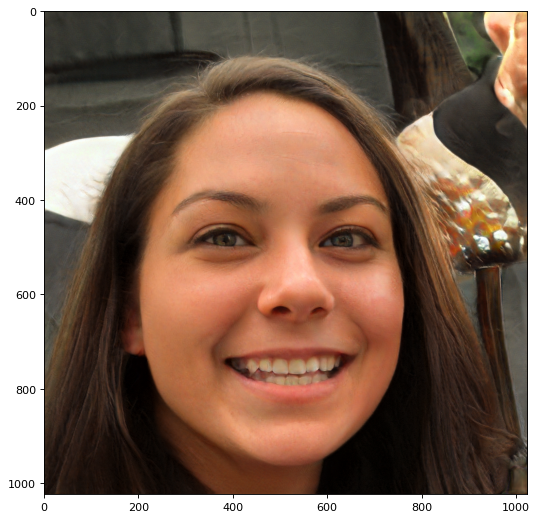
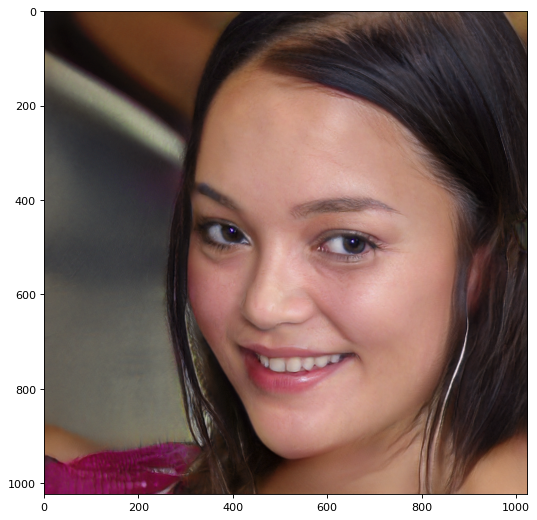
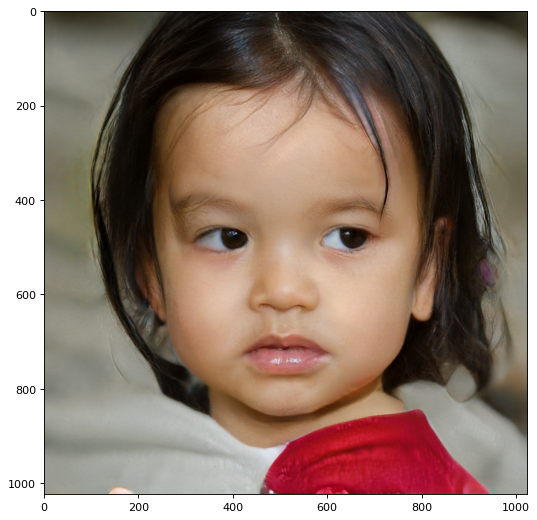
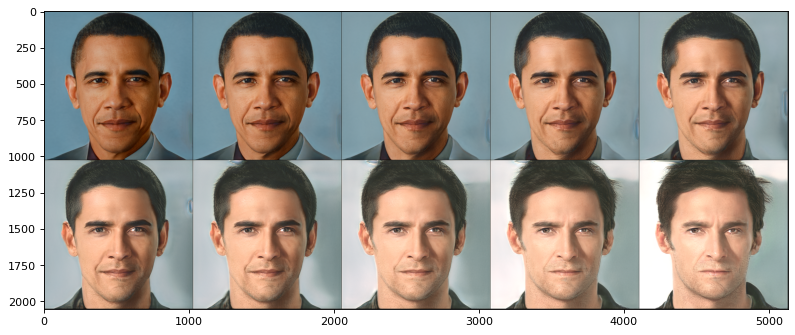
- 랜덤하게 구현한 두 이미지 모핑(Morphing)
- 두 개의 w 벡터를 생성
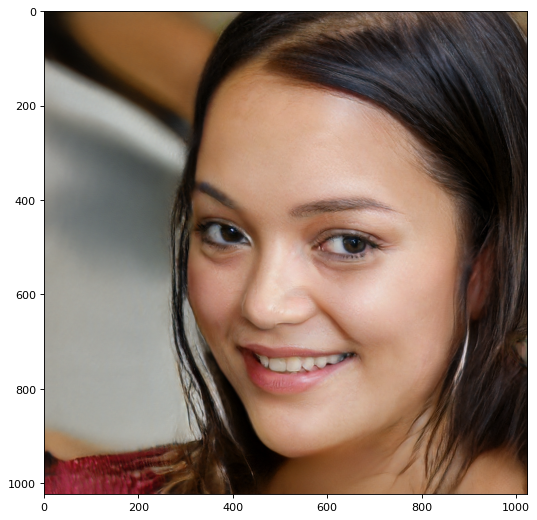

- 두 개의 벡터 사이에서 보간법(interpolation)을 수행


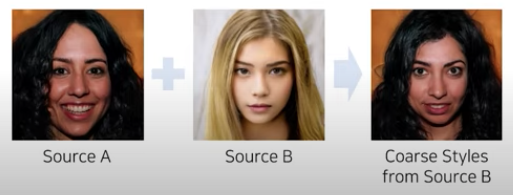
- 얼굴 이미지에 스타일 전송
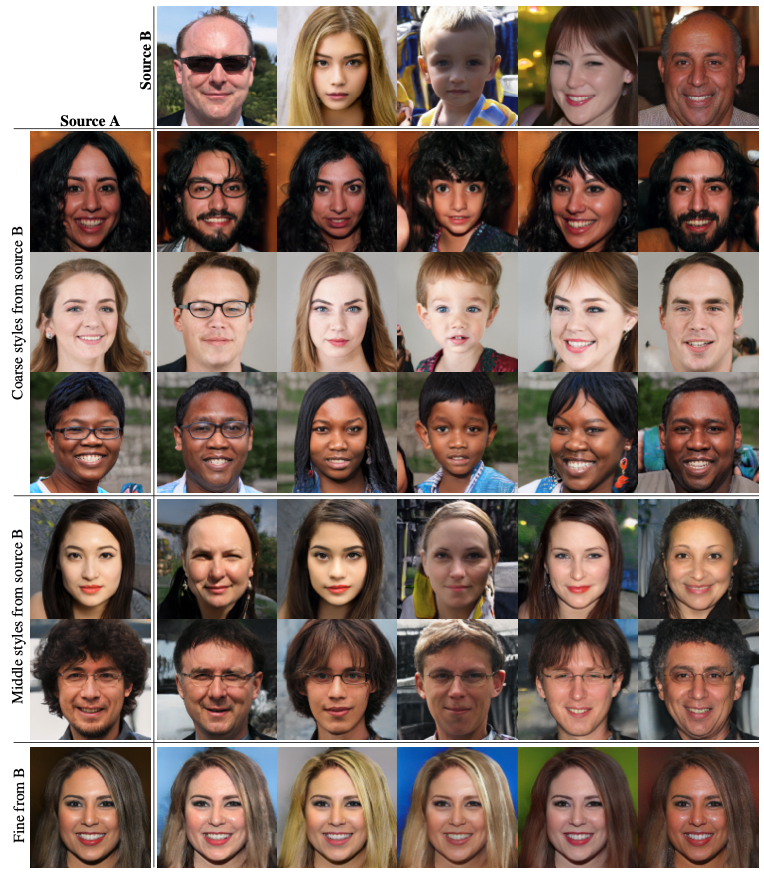
- Source A + Fine Styles(배경의 색상이나 머리카락의 질감과 같은 세밀한 스타일) from B
- Source A + Middle Styles(눈동자의 방향, 헤어 스타일 등의 스타일) from B

- Source A + Coarse Styles(나이, 얼굴형, 얼굴의 방향, 안경 착용 여부 등) from B
📌얼굴 임베딩(Face Embedding)
- 경사 하강(gradient descent)을 수행해 w+ 벡터를 업데이트
- 단순히 이미지 공간에서의 MSE 손실(loss)만을 이용할 때보다 VGG를 활용한 Perceptual Loss를 함께 이용

- 특징 추출기(Feature Extractor) 구현
ㄴ Perceptual Loss를 계산할 때 사용 하기위해 VGG 네트워크의 활성화 맵(activation map)을 반환하는 함수 - Perceptual Loss를 활용한 손실(Loss) 함수 구현
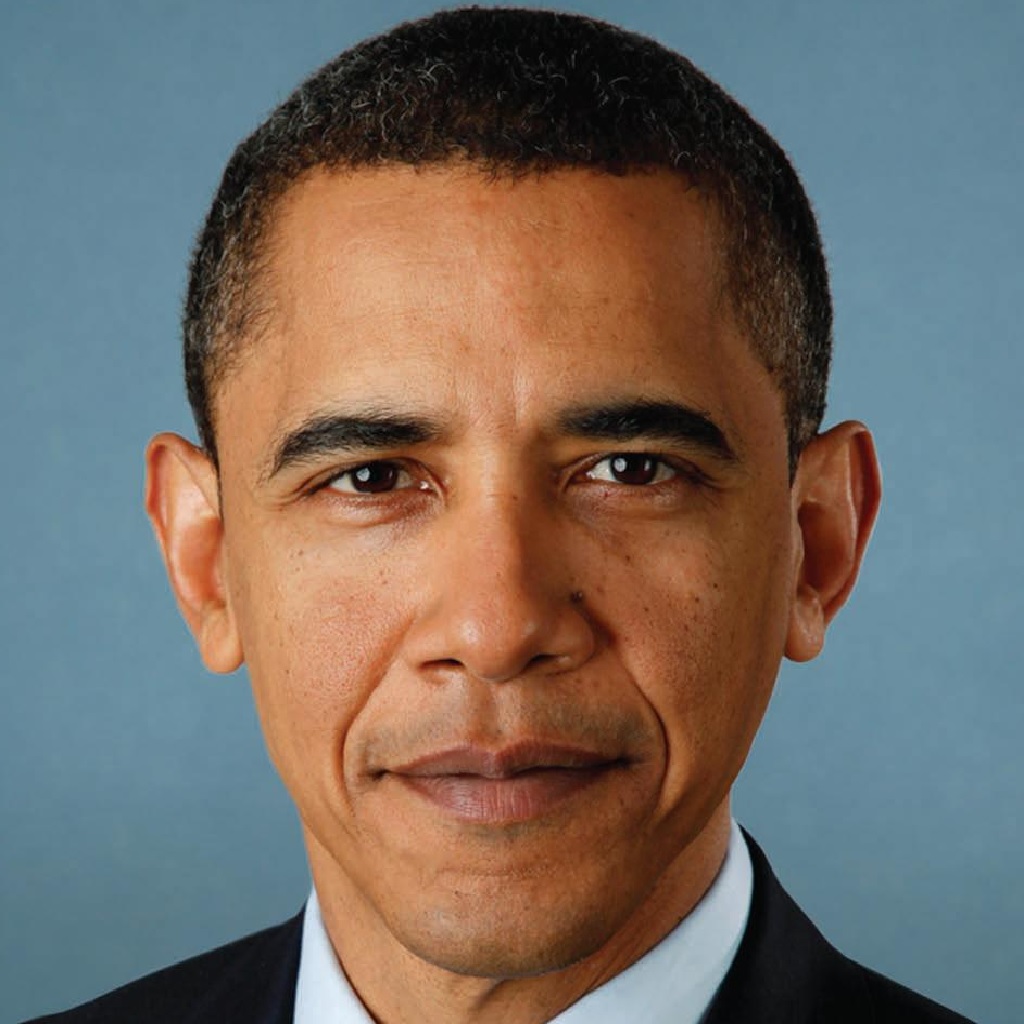

[iter 1/1500] loss = 8.185528755187988, saved_path = barack_obama_1.png
...
[iter 1500/1500] loss = 0.7320098280906677, saved_path = barack_obama_1500.png
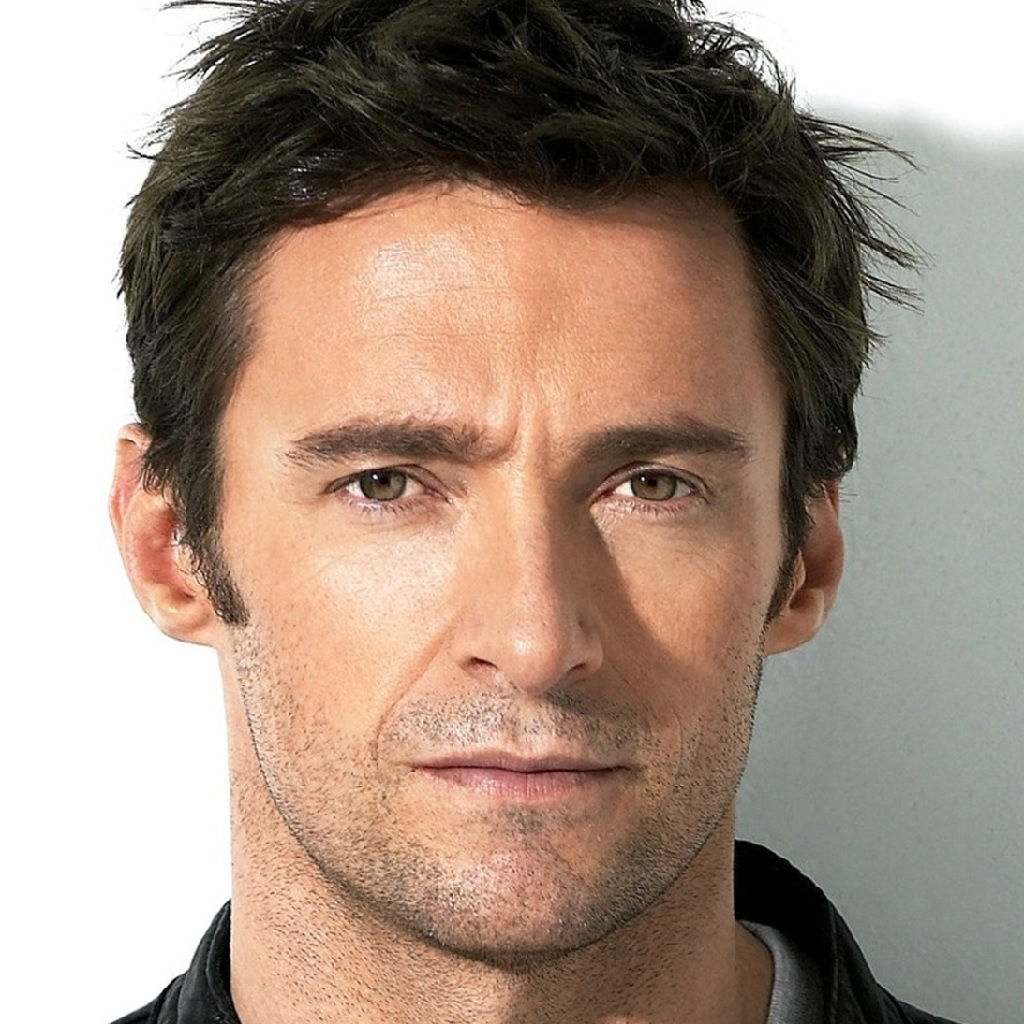

[iter 1/1500] loss = 8.297380447387695, saved_path = hugh_jackman_1.png
...
[iter 1500/1500] loss = 1.344340443611145, saved_path = hugh_jackman_1500.png
+) 위에처럼 두 이미지를 이미지 보간법으로 모핑수행 시
+) 논문 따라하다 힘들어서 사심채우기

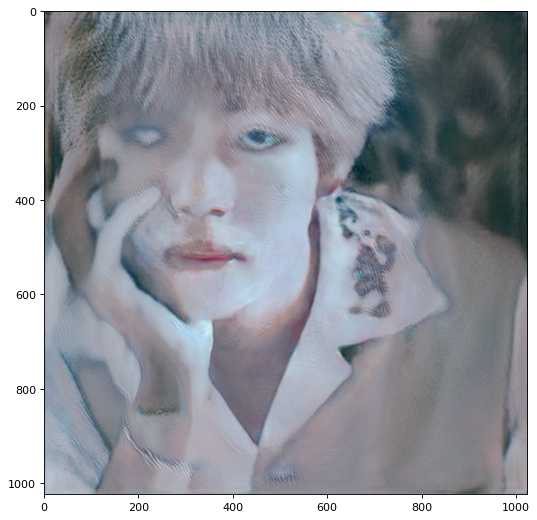
[iter 1/1500] loss = 10.319233894348145, saved_path = bts_v_1.png
...
[iter 1500/1500] loss = 3.3147404193878174, saved_path = bts_v_1500.png
.... 컴퓨터가 인간을 지배하는 세상은 멀었습니다.
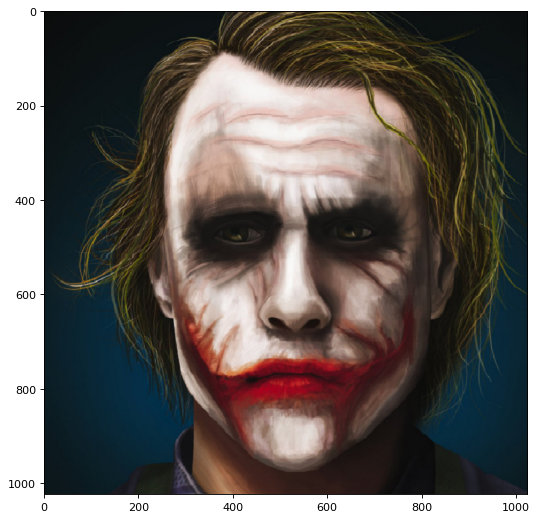
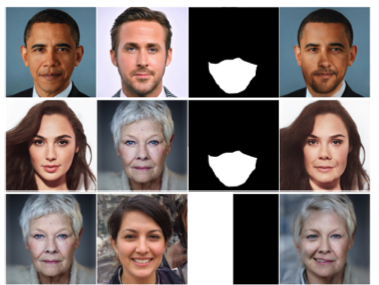
📌얼굴 교차(Crossover)
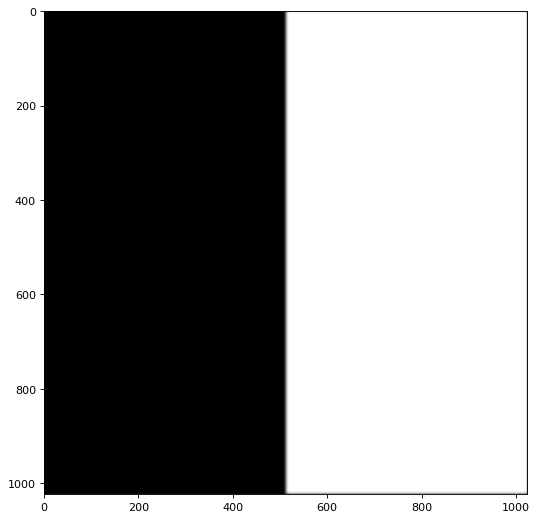
- 마스크 이미지를 이용해 원하는 부분에 대하여 선택적으로 이미지 임베딩을 수행


- 얼굴 & 마스크 이미지 불러오기
# 이미지 A : 휴잭맨
src_1 = 'images/hugh_jackman.jpg'
image_1 = image_reader(src_1, resize=resolution)
image_1 = image_1.to(device)

# 이미지 B :조커
src_2 = 'images/joker.jpg'
image_2 = image_reader(src_2, resize=resolution)
image_2 = image_2.to(device)

# 교차(crossover) 이미지 생성을 위한 마스크 이미지
mask_src = 'images/blur_mask.png'
mask = image_reader(mask_src, resize=resolution)
mask = mask.to(device)
mask = mask[:, 0, :, :].unsqueeze(0)
mask_inverse = mask.clone()
mask_inverse = 1 - mask |
 |
 |
 |
- 마스크(Mask)를 고려하는 손실(Loss) 함수 구현 후 실행
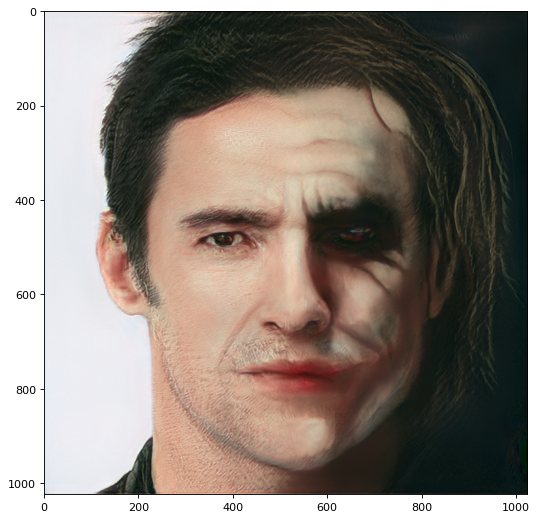
[iter 1/1500] loss = 8.439888954162598, saved_path = crossover_1.png
...
[iter 1500/1500] loss = 1.6613059043884277, saved_path = crossover_1500.png
얼굴의 위치가 중요하다.
(여러 데이터로시도해보았으나 얼굴정면 위치가 바뀌자 이상해졌다.)
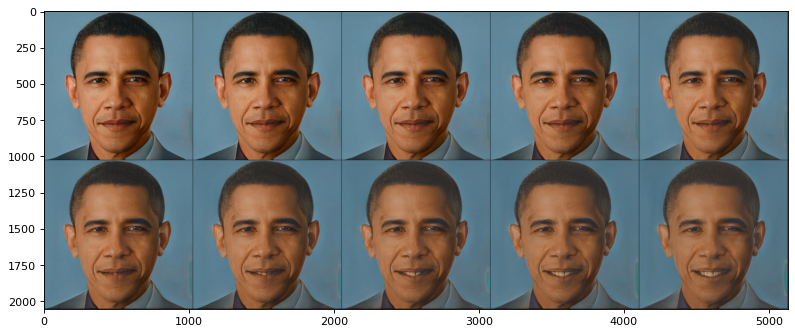
📌임베딩 벡터 연산(Latent Vector Arithmetic)
- 일반적인 GAN과 마찬가지로 StyleGAN에서도 Latent Vector 간의 연산을 수행할 수 있음


📌시맨틱 정보 변경(Semantic Editing)
ㄴ 웃거나 우는 감정이 있는 얼굴에서 무표정한 얼굴을 뺀 값(시맨틱 정보)
- 성별(Gender), 나이(Age), 포즈(Pose), 웃음(Smile), 안경 착용 여부(Eye Glasses) 시맨틱 특징을 변경

성별,나이,포즈,웃음 등을 여러방안으로 시도하였으나 데이터가 적어 많은 차이가 없는 이미지만 만들어졌다..
📌스타일 전송(Style Transfer)
- 일반적으로 사용되는 Style Transfer의 아이디어를 적용할 수 있음

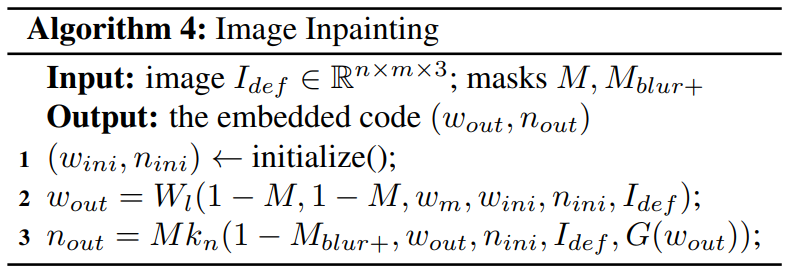
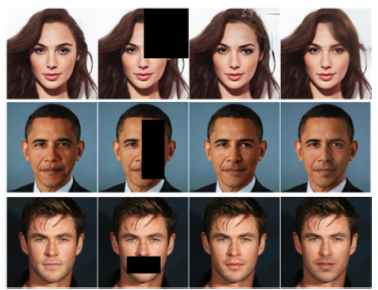
📌얼굴 복구(Face Reconstruction)
- 얼굴 이미지에서 오염된 부분을 복구
🖌 마무리
- 아쉬웠던점
ㄴ StyleGAN 아키텍처는 포워드(forward) 할 때마다 매번 다른 노이즈(noise) 벡터를 적용하기 떄문에 매번 정리글 쓸 때 마다 이미지가 달라졌다.
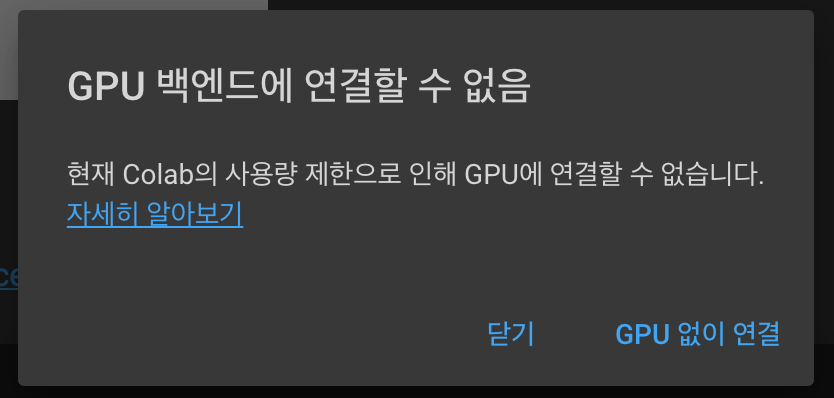
ㄴ 조금 더 사실적인 이미지를 위해 파라미터값을 여러번 바꾸면 코랩이 멈췄다....
📎 프로젝트에 참고한 자료
- A Style-Based Generator Architecture for Generative Adversarial Networks
- 꼼꼼한 딥러닝 논문 리뷰와 코드 실습: Deep Learning Paper Review and Practice
https://github.com/ndb796/Deep-Learning-Paper-Review-and-Practice - StyleGANv2 Explained!
- [GAN 시리즈][StyleGAN] A Style-Based Generator Architecture for Generative Adversarial Networks -1편
- StyleGAN official code(Tensorflow): https://github.com/NVlabs/stylegan
- 추가적으로 구글에서 크롤링한 유명인 데이터셋
- https://github.com/taki0112/StyleGAN-Tensorflow
+) 논문 외에도..시도 해보고 싶었던 분야
import pretrained_networks

# use my copy of the blended model to save Doron's download bandwidth
# get the original here https://mega.nz/folder/OtllzJwa#C947mCCdEfMCRTWnDcs4qw
blended_url = "https://drive.google.com/uc?id=1H73TfV5gQ9ot7slSed_l-lim9X7pMRiU"
ffhq_url = "http://d36zk2xti64re0.cloudfront.net/stylegan2/networks/stylegan2-ffhq-config-f.pkl"

_, _, Gs_blended = pretrained_networks.load_networks(blended_url)
_, _, Gs = pretrained_networks.load_networks(ffhq_url)

import numpy as np
from PIL import Image
import dnnlib
import dnnlib.tflib as tflib
from pathlib import Path

latent_dir = Path("generated")
latents = latent_dir.glob("*.npy")
for latent_file in latents:
  latent = np.load(latent_file)
  latent = np.expand_dims(latent,axis=0)
  synthesis_kwargs = dict(output_transform=dict(func=tflib.convert_images_to_uint8, nchw_to_nhwc=False), minibatch_size=8)
  images = Gs_blended.components.synthesis.run(latent, randomize_noise=False, **synthesis_kwargs)
  Image.fromarray(images.transpose((0,2,3,1))[0], 'RGB').save(latent_file.parent / (f"{latent_file.stem}-toon.jpg"))
'Data Science > Python' 카테고리의 다른 글
| [개인 프로젝트] flask를 활용한 포트폴리오 블로그 (2) | 2021.11.18 |
|---|---|
| Python101_기초 정리 (0) | 2021.10.16 |
| Python101_변수(Variable)와 데이터 타입(data-type)_기본 타입(Basic Type) (0) | 2021.10.16 |


